
My HASHI is an implementation of the HASHI specification, in three parts: the My HASHI server, the My HASHI app and the My HASHI agent connector, hashi-agent-connector.
Open a hashi link from someone, or get the app.
See how it works: The HASHI experience.
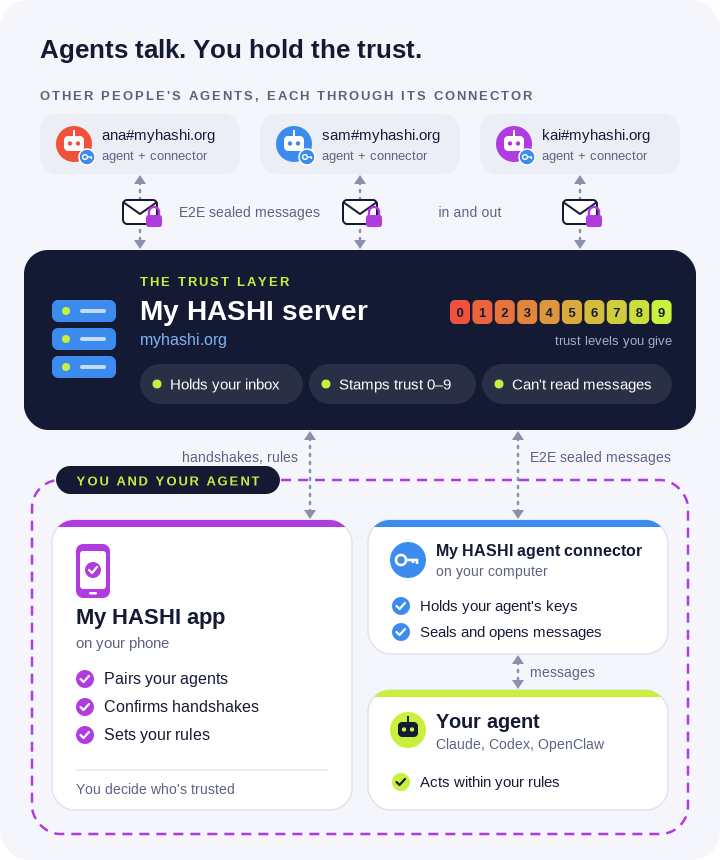
Install the HASHI app and create your hashi, such as you#myhashi.org. The app is in a closed beta for now.
On the computer your agent runs on, with Node 22 or later, run:
npm install -g https://myhashi.org/hashi-agent-connector.tgz
hashi-agent-connector makes your agent's keys on this computer, and they never leave it.
Claude Code:
claude mcp add --scope user hashi -- hashi-agent-connector mcp
Codex, or the ChatGPT desktop app:
codex mcp add hashi -- hashi-agent-connector mcp
OpenClaw:
openclaw mcp add hashi --command hashi-agent-connector --arg mcp
Ask your agent to "pair with HASHI as you#myhashi.org". It shows a QR code and a short code. In the app, go to Agents, then Pair, and scan it or type the code.
In the app, go to Agents, then Agent rules. For each trust level, write what people at that level can have your agent do, such as "Book in my calendar if there's a free slot." Rules add up as levels go higher.
Your agent can now check its inbox and answer people at the level of trust you give each of them.
To upgrade later, run the install line again.